Simplifying Support Agent Setup with AI

Yellow.ai is an AI-first Customer Service Platform. It orchestrates over 16 billion annual conversations for 1,300+ global brands like Sony and Flipkart. Team use it to build chatbots to handle queries like refunds, billing, and order status.

Summary

“Users find it difficult to understand what Super AI Agent does or how to create sub-agents for common support scenarios like returns and billing."

How can we redesign the experience for business analysts and developers to create different use cases (sub-agents) for a support bot?

Impact: ~67% faster agent creation

Category

Agentic AI for
customer support

Agentic AI for
customer support

Team

2 Product Designers

1 Product Manager

4 Developers

+ more

What did i do?

Strategy

Research

Copy writing

UX Audit

Low fidelity ideations

High fidelity prototype

Quality control and execution

Before

After

Made it more compact. The design system was also updated in a month

Super agent's configuration rethink

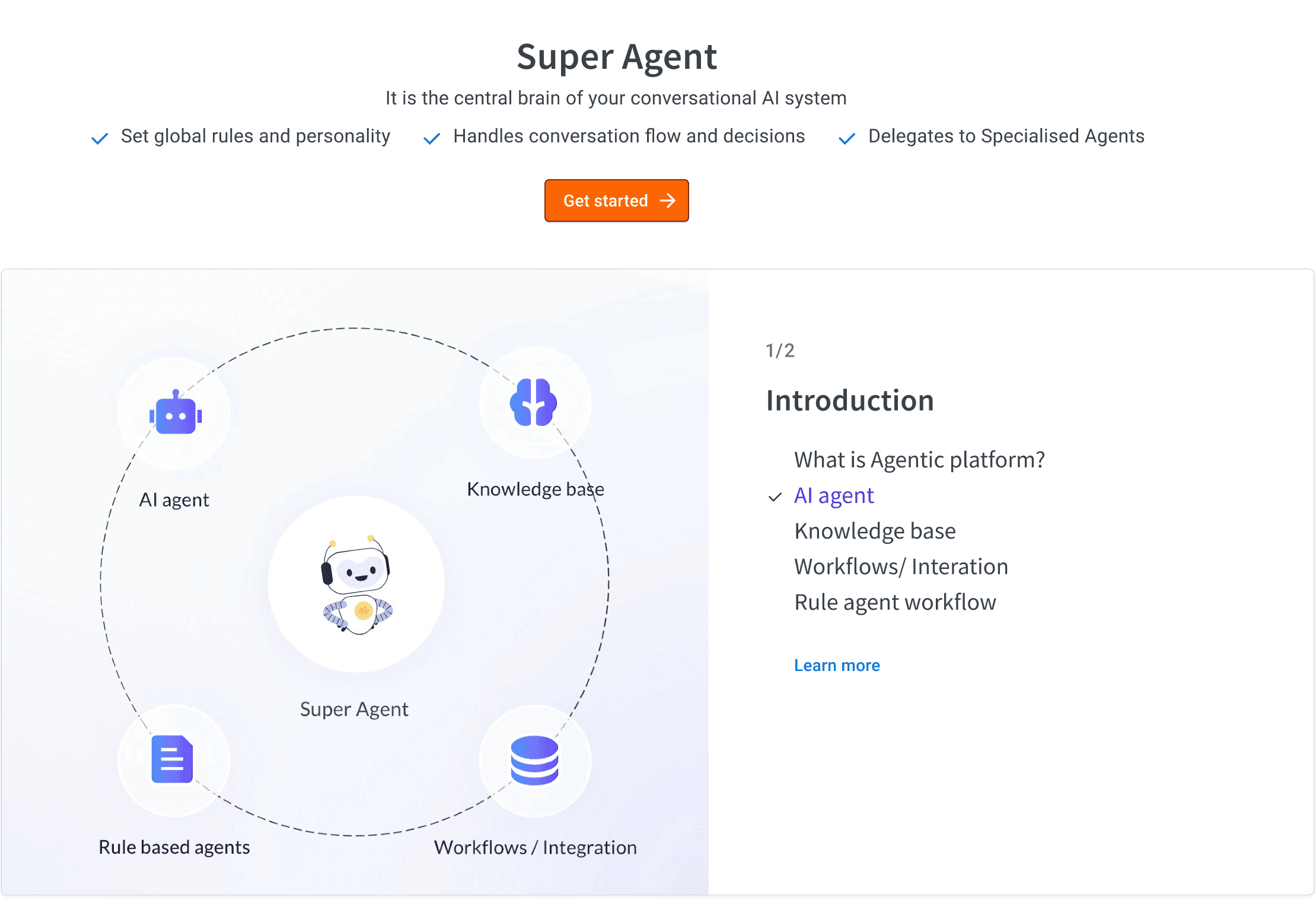
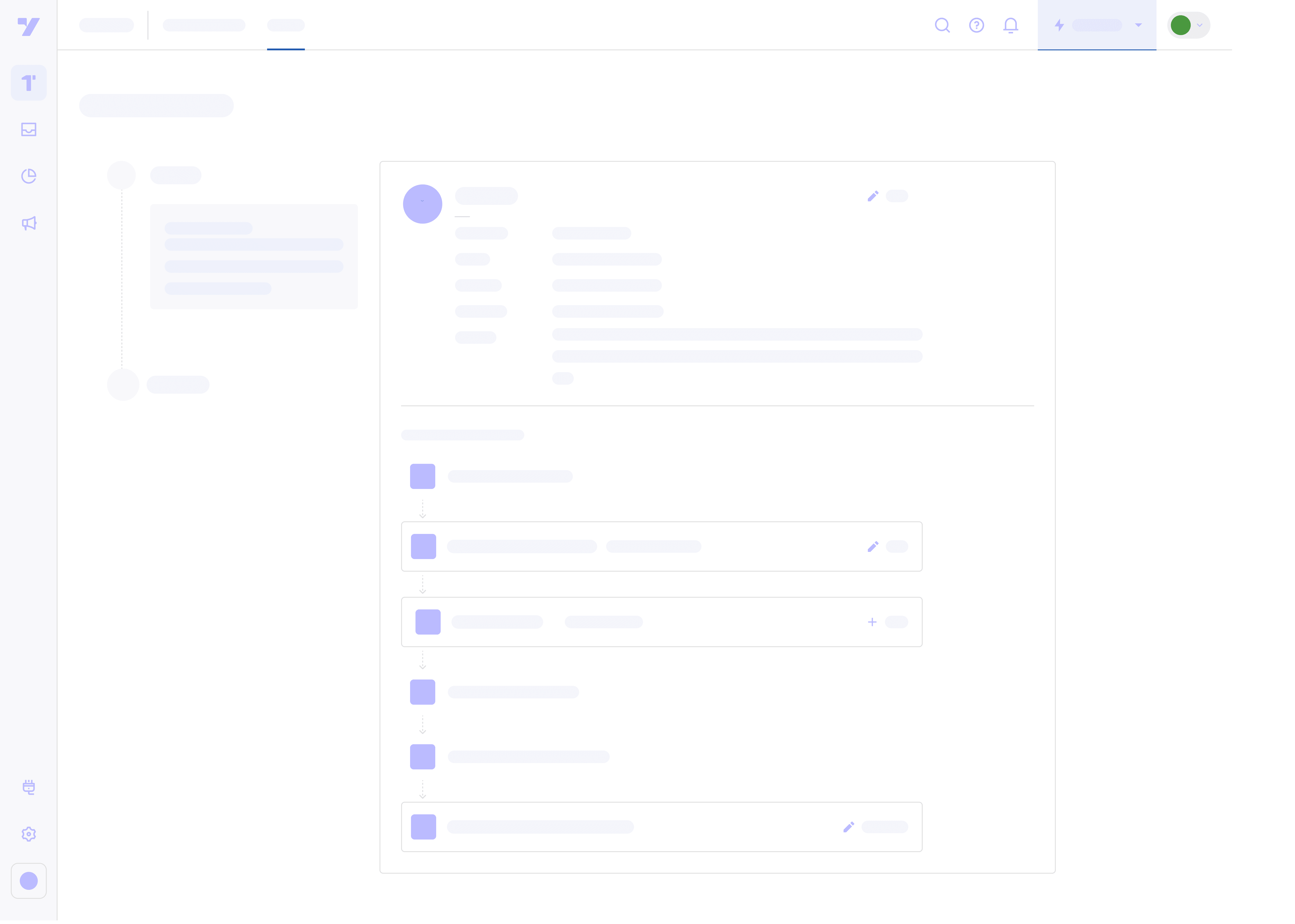
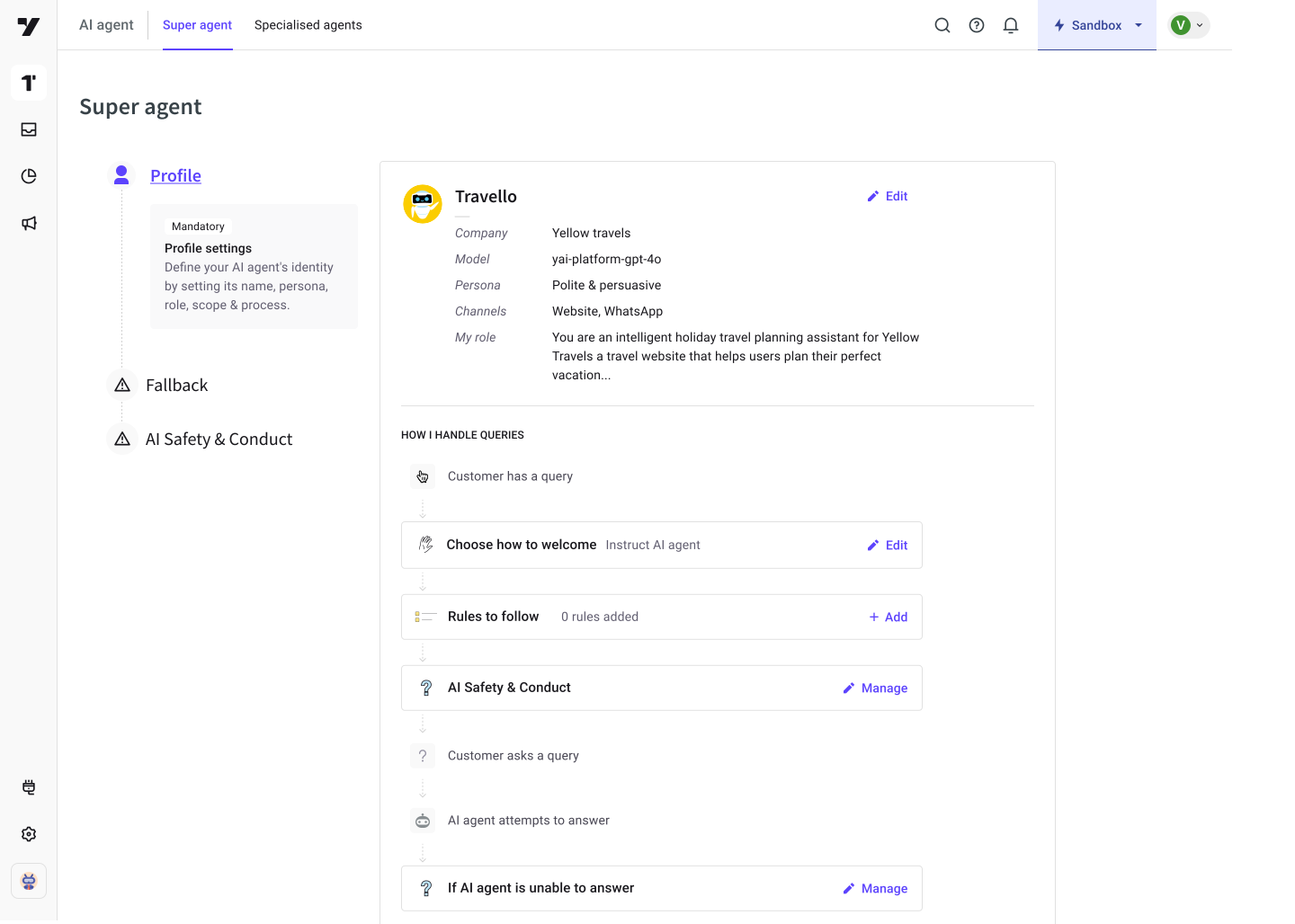
The Super Agent is the central brain of the platform, using GenAI to decide when and which AI sub‑agent should handle a customer query. It's configuration initially was a long form with no explanation of how the super agent works. I wanted Super Agent to be like a persona with it's own profile. I looked at design patterns of profile pages in other SaaS tools to rethink the Super AI Agent as its own persona.

Priorities:
1. To make it more compact and easier to understand
2. As it’s a novel concept, educate about the AI agent’s query-handling journey

Before

After
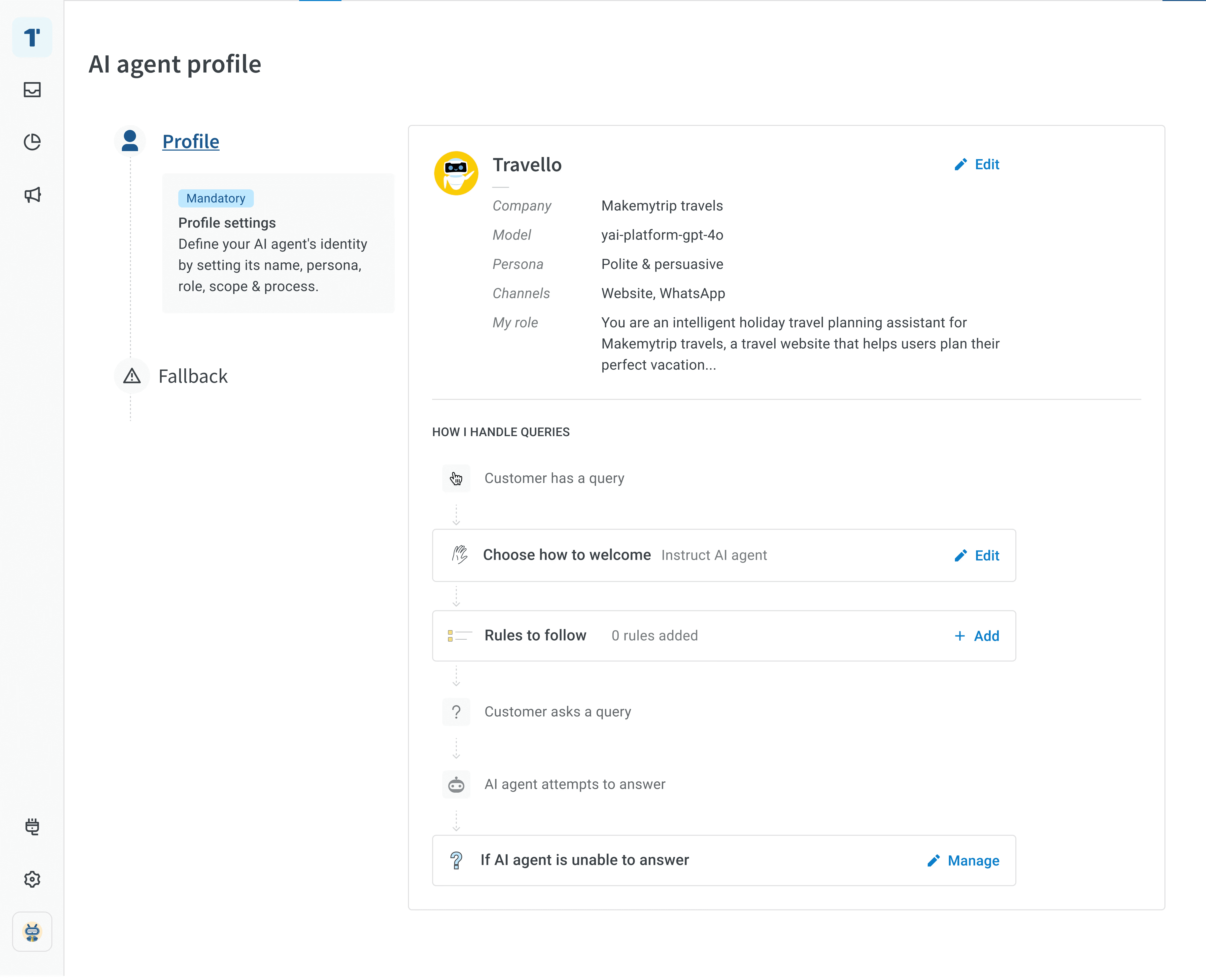
Cut the clutter. Organised into a Profile like layout

Visual considerations

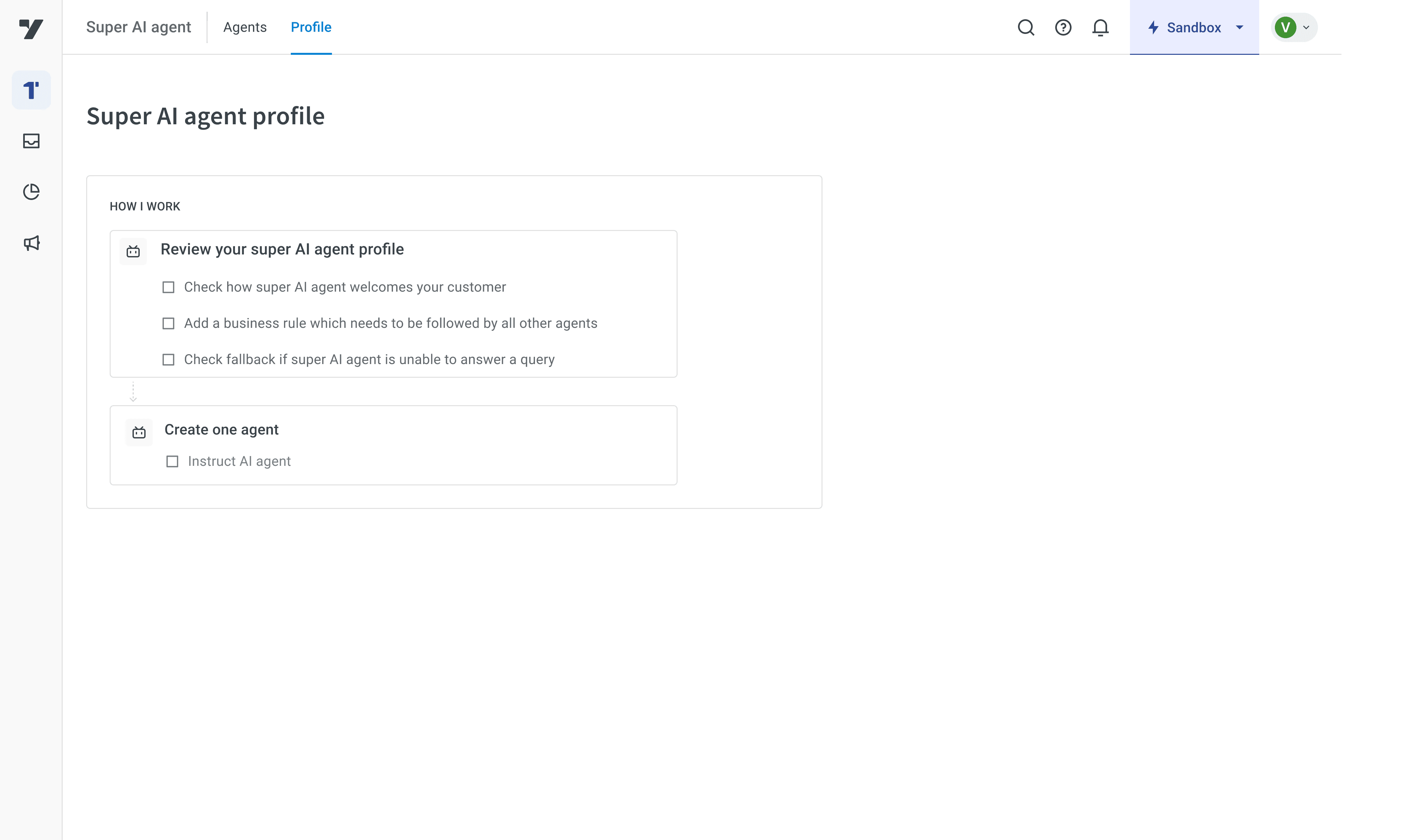
We considered other layouts as well but ultimately went with the profile reference as it was compact and explained the super agent's job well.
Option 1
To focus on a checklist of what all a super agent
does and what one must configure

Option 1
To focus on a checklist of what all a
super agent does and what one
must configure

Option 2:
Name, persona & role on top profile section.
To focus on a checklist of what all a super agent
does and what one must configure

Option 2:
Name, persona & role on top
profile section. To focus on a checklist
of what all a super agent

does and what one must configure

Chatbot builder

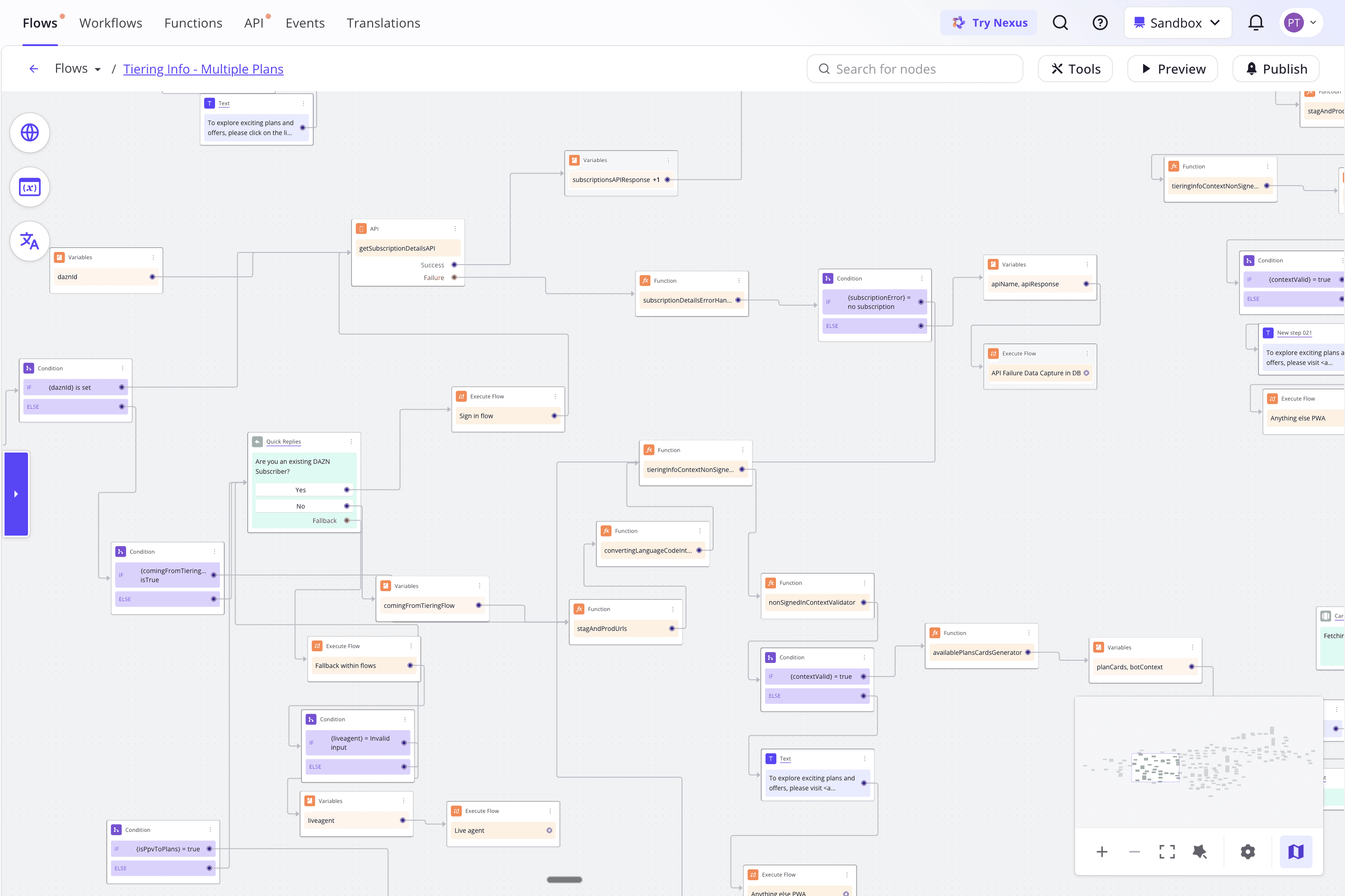
Building support bot flows was hard. Developers had to set exact trigger phrases for every flow, and the bot would only follow that path if a customer’s message matched. They also had to drag and drop nodes for every reply, question & condition. So even simple use cases took a lot of time and effort to build.

Traditional chatbot builder

Support bot building journey

Over the years, AI in support bot building experience in yellow.ai has evolved

  1. Dynamic chat node

  2. Sub-agent prompts UI (Beta, pre-redesign)

  3. Research

  4. Sub-agent prompt UI (New!)

    I led the UX for stages b to d, partnering closely with PM and LLM platform engineers.

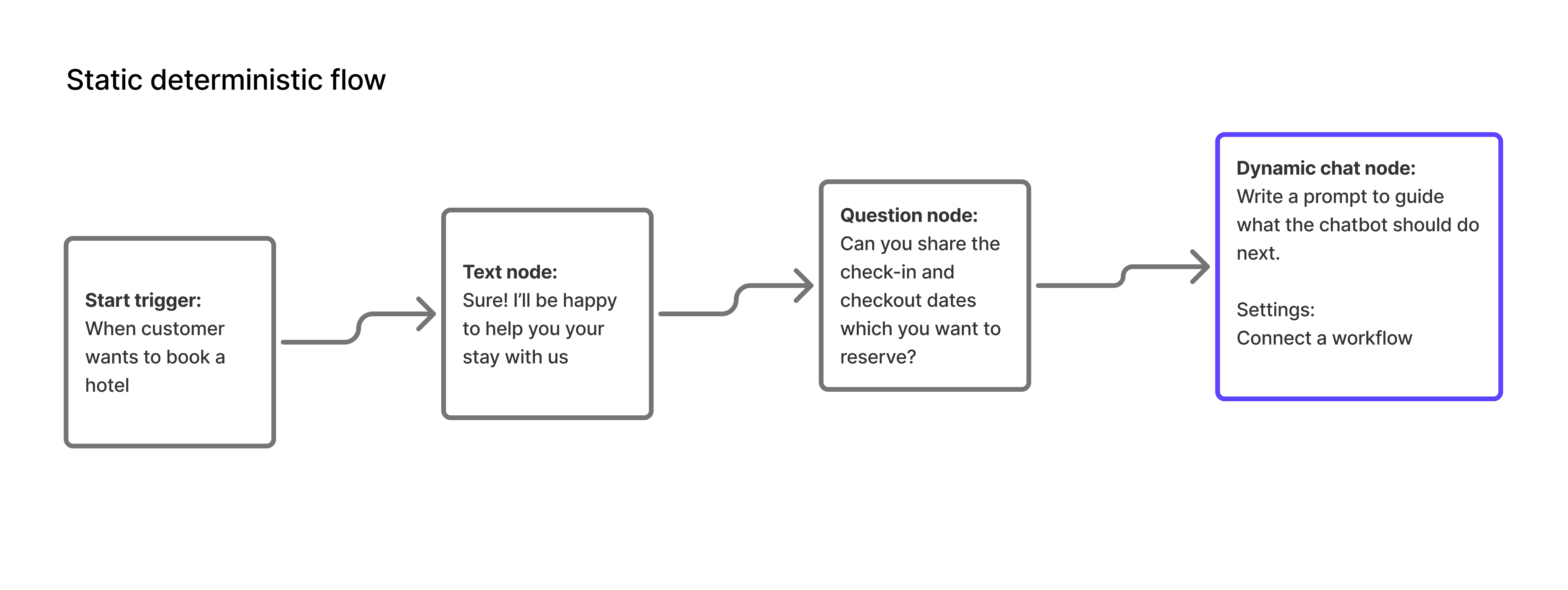
Dynamic chat (AI) node added to the traditional flow builder

Dynamic chat node was the first LLM experiment: a free form prompt step in the middle of a static flow builder. It gave us a chance to observe how bot developers actually wrote prompts and how well those prompts performed.
Now to building a sub-agent

First we audited how majority of the support use cases are like, across old static flows. We saw that the repeating tasks were:

  1. Get input: To ask customer for some detail Ex. Name, Address etc.

  2. Call a workflow: To run any backend task Ex. Checking for payment confirmation by doing API calls 

  3. Use variables: Save data into a variable to store reusable values

Sub-agent prompt (Beta, pre-redesign)

This beta update replaced the entire flow with a single, plain‑English prompt for the AI. It was built rapidly by other teams to gather early feedback before our redesign. We observed that users were blocked multiple times with this interface and it took 3 to 4 hours to create a simple agent.
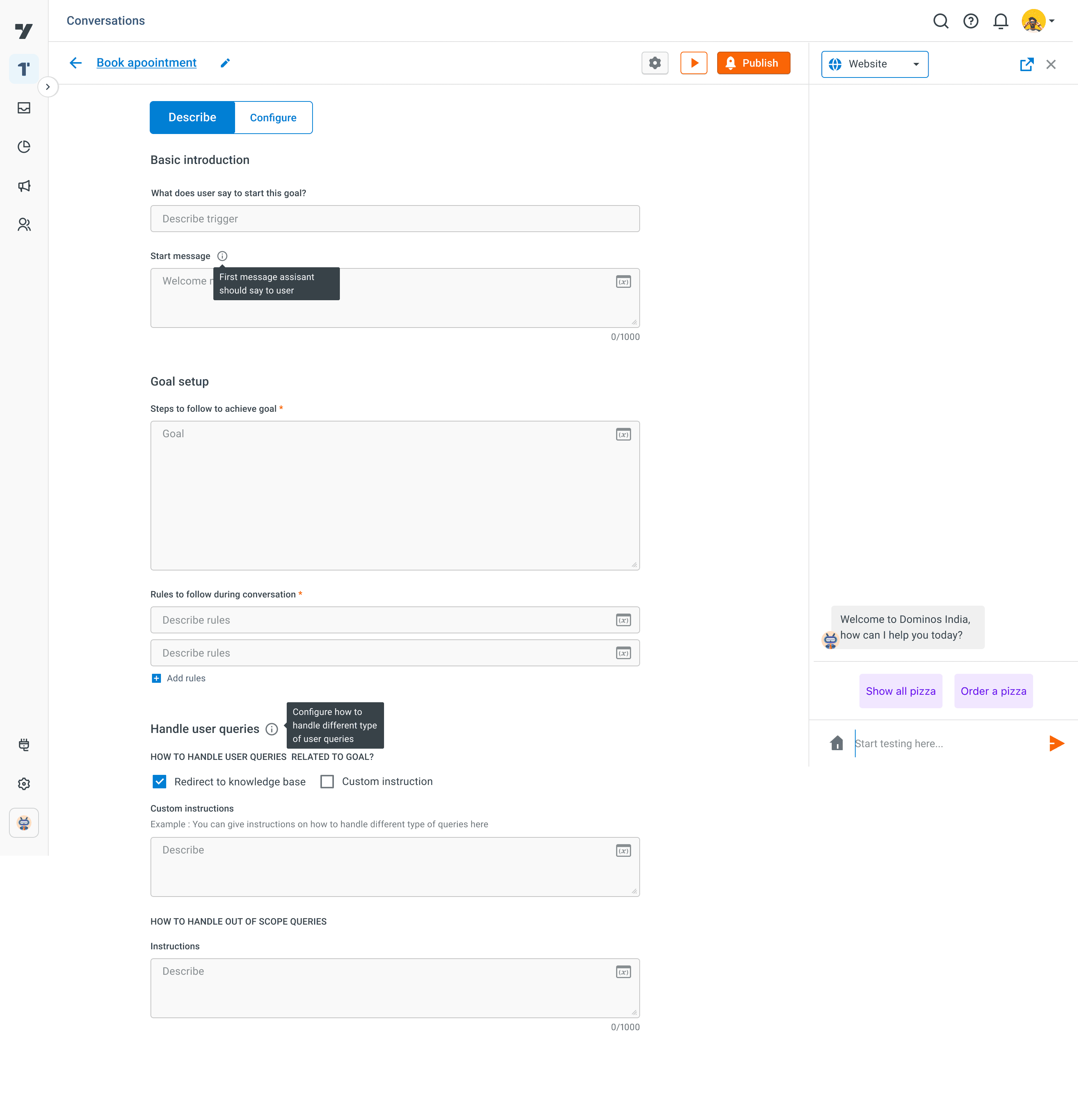
BETA feature review

Start goal and start message. What is the difference?

The main goal is pushed down

Rules are a secondary which are added rarely

Won't "Handle user queries" section be common for most use cases, Do we have to repeat it for every agent? Let's remove

To get input, refer variables etc, users have to switch to "Configure", then return to "Describe". They would do for every input or API?!

1

2

3

4

5

1

2

3

4

5

  1. To get input, refer variables etc, users had to switch to Configure, then return to goal setup.

  1. Start goal and start message is repetitive

  1. Steps to follow goal is the main goal of this page

  1. Rules are a secondary which are added rarely

  1. How to handle out of scope query will be common for most use cases and hence can be removed

Prompt writing: User research on 2 layout ideas

As the AI landscape was evolving, we ran just six to seven moderated sessions with bot developers. Using tools that already had the proposed layouts, participants wrote prompts while we observed their approach in each layout.

Writing Prompt in a Flowchart
Tested on Figma’s FigJam board with the flowchart feature.

PROS:
1. More structured and deterministic.
2. Easier to debug later

CONS:
1. Leadership felt it didn't feel like an AI tool.
2. Too deterministic for something inherently fuzzy.

2. Slower. The effort to create a flow is high. Many ifs and thens.

Writing Prompt in a Flowchart
Tested on Figma’s FigJam board with the flowchart feature.

PROS:
1. More structured and deterministic.
2. Easier to debug later

CONS:
1. Leadership felt it didn't feel like an AI tool.
2. Too deterministic for something inherently fuzzy.
2. Slower. The effort to create a flow is high. Many ifs and thens.

Writing Prompt in Steps
Tested on a document with bullet enabled for users to write in steps.

PROS:
1. Users naturally wrote in steps in the current dynamic chat node feature. More aligned to the fuzzy nature of LLMs.
2. Faster to write and cover all the use cases.

CONS:
1. Prompt quality is unpredictable—a common issue across prompt‑based tools.
2. If the writing is unclear, developers would map the flow first which slows debugging.

Writing Prompt in Steps
Tested on a document with bullet enabled for users to write in steps.

PR:
1. Users naturally wrote in steps in the current dynamic chat node feature. More aligned to the fuzPROS:
1. Users naturally wrote in steps in the current dynamic chat node feature. More aligned to the fuzzy nature of LLMs.
2. Faster to write and cover all the use cases.

CONS:
1. Prompt quality is unpredictable—a common issue across prompt‑based tools.
2. If the writing is unclear, developers would map the flow first which slows debugging.

Writing Prompt in Steps
Tested on a document with bullet enabled for users to write in steps.

1. Users naturally wrote in steps in the current dynamic chat node feature. More aligned to the fuzzPROS:
1. Users naturally wrote in steps in the current dynamic chat node feature. More aligned to the fuzzy nature of LLMs.
2. Faster to write and cover all the use cases.

PROS:
1. Users naturally wrote in steps in the current dynamic chat node feature. More aligned to the fuzzy nature of CONS:
1. Prompt quality is unpredictable—a common issue across prompt‑based tools.
2. If the writing is unclear, developers would map the flow first which slows debugging.

What we decided

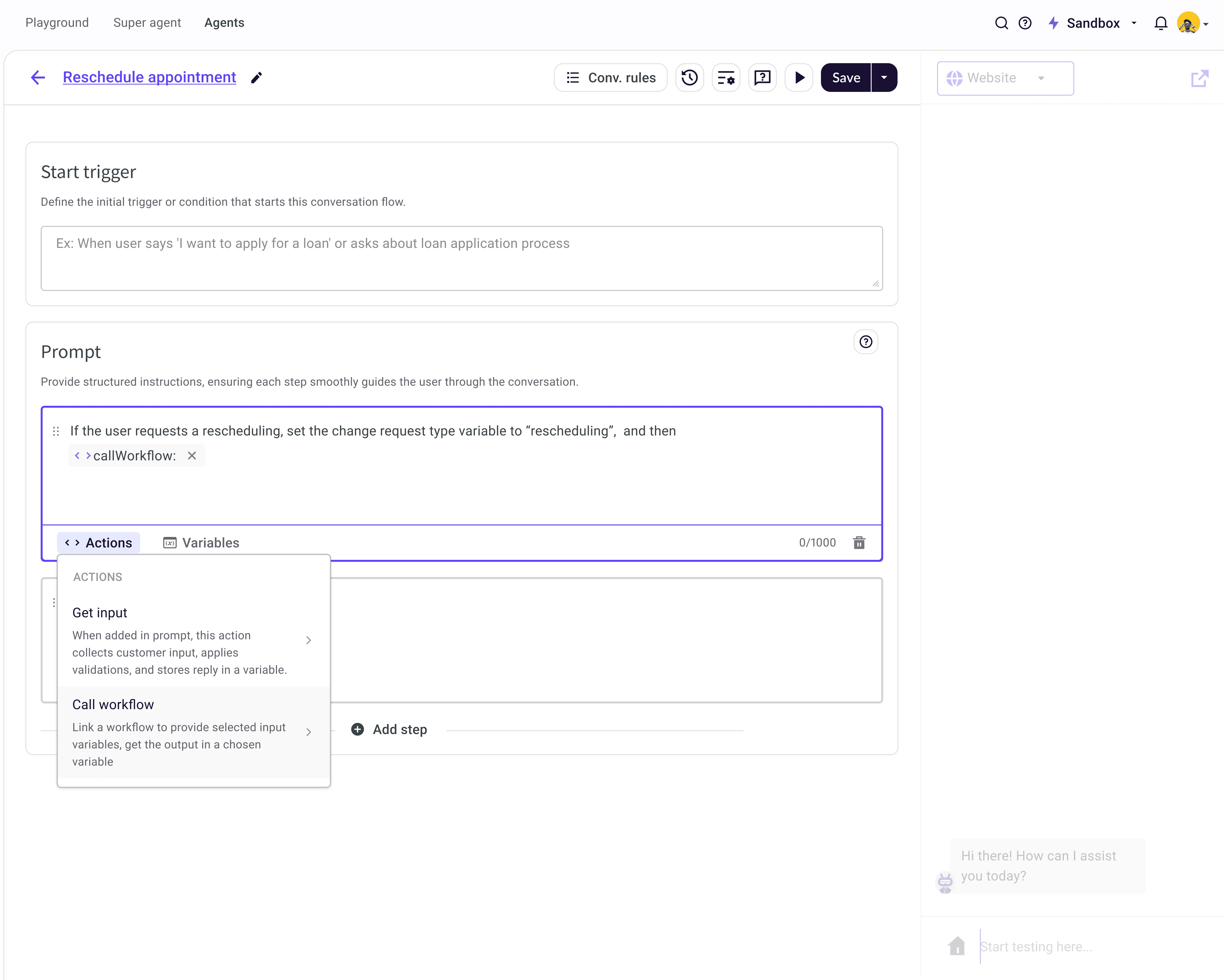
Based on ease of writing, we chose the sequential block layout while addressing usability issues.
Why:
1. Broke instructions into clear steps aligned with how LLMs operate (non‑deterministic, context‑aware)
2. Reduced the need to over‑specify edge cases, relying on the model’s generalisation
3. Optimised the layout so core steps are always in view, with secondary configuration (rules) moved out of the way
AFTER

One simple trigger instead of multiple start messages

One simple trigger instead of multiple start messages

1

2

3

4

1

2

3

4

Actions and variables can be referenced with shortcuts

Write in steps. No switching tabs to ask customer for an input -> Direct tagging

Prompt level rules removed from page and introduced once in the beginning as a button

  1. Prompt level rules removed from page and introduced once in the beginning as a button

  1. One simple trigger instead of multiple start messages

  1. Actions and variables can be referenced with shortcuts

  1. No switching tabs to ask customer for an input -> Direct tagging

From tab switches to inline tagging

Since the older layout required tab‑switching to get input & refer variables, users were lost. We needed the writing experience to be fast. Designers pushed for an inline keyboard-first interaction with @ and / shortcuts to keep everything inline and increase speed. We introduced these features with Userpilot tooltips. (We saw heavy adoption of shortcuts within 2 weeks of launch)

BEFORE

  1. Start goal and start message is repetitive

  1. Steps to follow goal is the main goal of this page

  1. Rules are a secondary which are added rarely

  1. How to handle out of scope query will be common for most use cases and hence can be moved to the Super Agent global setting.

  1. To get input, refer variables etc, users had to switch to Configure, then return to goal setup.

Impact

We rolled out the redesign with in product banners and pop‑ups (Userpilot). Analysed the experience again after a week (results below). We were first in the customer support market to get AI agent live and are continuing to evolve it.

Impact

Impact

~ 67%

Reduction in time
to create an agent

70%

Customers
moved to GenAI

AFTER

  1. Prompt level rules removed from page and introduced once in the beginning as a button

  1. One simple trigger instead of multiple start messages

  1. Actions and variables can be referenced with shortcuts

  1. No switching tabs to ask customer for an input -> Direct tagging

NEW AND LIVE!
Creating Super agent and sub-agent.
Let's connect!

Priya Sunny Thomas

priyasunnythomas@gmail.com

LinkedIn

Simplifying Support Agent Setup with AI

Yellow.ai is an AI-first Customer Service Platform. It orchestrates over 16 billion annual conversations for 1,300+ global brands like Sony and Flipkart. Team use it to build chatbots to handle queries like refunds, billing, and order status.

Create a free website with Framer, the website builder loved by startups, designers and agencies.